Shadow AI under control

Governance and Security for your data

Shadow AI is already in your company: your team pastes, drags and attaches company data into ChatGPT, Claude, Gemini and WhatsApp. Carbon shows which AI tools are in use, stops sensitive data before it leaves the computer, and keeps sealed evidence of every decision.

Installs in minutes, no server in your networkMetadata only by defaultNo credit card to try
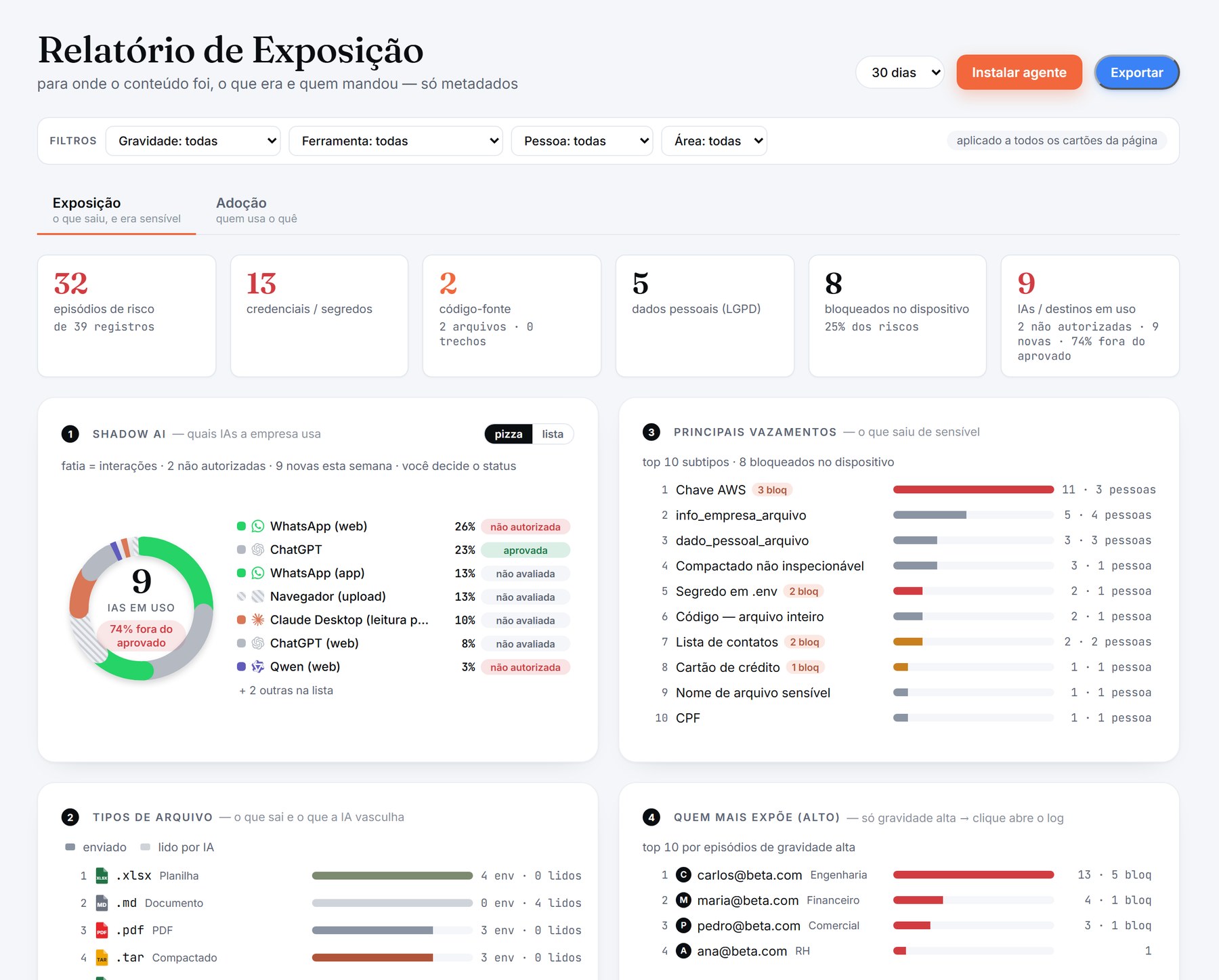
app.carbon-labs.co · Exposure report
Carbon dashboard: WhatsApp Web as the top destination, marked as not authorized; leaks, file types and people Shadow AI card: which AI tools the company uses, with WhatsApp Web first, marked as not authorized
Recognized in the browser and in desktop apps ChatGPT Claude Gemini Copilot DeepSeek Qwen Kimi Mistral Perplexity Grok Manus Lovable Replit WhatsApp Web WhatsApp (app) Teams (app)
Why now

AI arrived faster than governance

New AI tools appear every week, and teams use them before anyone approves them. The cost of that gap is already measured.

+US$ 670K

more, on average, per data breach at organizations with high levels of shadow AI

1 in 5

organizations studied had a breach involving shadow AI

63%

of breached organizations had no AI governance policy, or were still writing one

Source: IBM, Cost of a Data Breach Report 2025.

Soon the question won’t be “do you use AI?” but “how do you govern your use of AI?”

One agent, every exit

Wherever company data leaves, Carbon gets there first

One Windows agent watches the four doors data uses today, in the browser and in desktop apps. No proxy, no certificate, nothing to install in your network.

Carbon agent
Windows · browser and desktop apps
ChromeEdgeWhatsAppChatGPTClaude
AI ON THE WEB
ChatGPTClaudeGeminiCopilotDeepSeekKimiPerplexity

Safe use of AI

See which AI tools are used and by whom, and decide: approved, tolerated or not authorized.

AI DESKTOP APPS
ChatGPT (app)Claude DesktopManus

AI apps under control

Pasting into the ChatGPT or Claude app gets the same check as the browser, and apps that read your disk show up as AI reads.

MESSAGING
WhatsApp WebWhatsApp (app)Teams (app)

Messaging without blind spots

A sensitive attachment does not leave through WhatsApp without a decision, on the web or in the Windows app.

FILES
WordExcelPowerPointPDFZIP

Files read from the inside

Word, Excel, PowerPoint, PDF and zip are read as text, end to end, before they leave.

What you get

What changes from the first day

Carbon turns a blind spot into a decision you can see, explain and prove.

Know every AI tool in use

Within minutes the dashboard lists which AI tools your company uses, by person and by area, including the ones nobody approved.

Shadow AI · 14 tools · 3 not authorized

Stop the leak as it happens

Paste, drag, attach or type: Brazilian IDs (CPF, CNPJ), card numbers with expiry and CVV, credentials and source code are caught before they leave.

CPF · ••••••25 · Kimi (web) · blocked

Read the whole file, not just its name

Word, Excel, PowerPoint, PDF and zip are read inside, even when the sensitive line is the last one of a 4 MB spreadsheet.

clientes-2026.xlsx · 4.4 MB · CPF in the last line

Close the WhatsApp blind spot

The most common and least watched channel: WhatsApp Web and the Windows app. A sensitive attachment stays on hold until someone decides.

WhatsApp (app) · attachment on hold · awaiting a decision

Prove what happened

Every decision is recorded and sealed. The DPO exports an evidence package that anyone can verify, without access to your systems.

Evidence package · verified: INTACT

Protect people, not only data

No keylogger. By default only metadata and a masked excerpt leave the computer. The optional screen capture is seen only by the DPO and the admin.

Excerpt sent: ••••••25 · the full text stays on the computer
AI governance

ISO/IEC 42001 and LGPD: the controls, with the evidence

ISO/IEC 42001:2023
1stcertifiable standard for AI management

An international standard for an AI Management System (AIMS), for organizations that develop, provide or use AI.

And Brazil’s LGPD, which asks for a record of every operation with personal data.

What the standard asksHow Carbon delivers it
Clear policies and responsibilities for AI useA policy per tool and per data type, with admin, DPO and auditor roles.
Risk managementSeverity per data type, and alerts by e-mail, Teams and Slack when something serious happens.
Controls, monitoring and continuous improvementA live dashboard, trends and the comparison with the previous period.
Transparency and traceabilityEvery use recorded, records sealed every day, and an audit trail of every admin action.
A basis to show maturity and trustA report for the board, CSV for the audit, and an evidence package with a certificate.

Carbon does not certify your company. It provides the controls and the evidence that an ISO/IEC 42001 or LGPD review asks for.

Source: ISO/IEC 42001:2023.

See it working

On WhatsApp and ChatGPT, with and without Carbon

Without Carbon, a client’s CPF (Brazil’s taxpayer ID) and an AWS key go out through WhatsApp and nobody ever knows. With Carbon in the Windows tray, the message stops before it leaves, the person decides with the reason on screen, and the dashboard records the episode with the data masked. If they decide to send, the DPO sees the screenshot. And if the company marks an AI tool as not authorized, pasting into it is blocked.

Animated demo in four parts. First: on a Windows computer without Carbon, someone types a client’s CPF and an AWS access key into WhatsApp, and both messages go out without anyone knowing. Second: with Carbon in the Windows tray, the same message with the CPF is held at Enter, the Carbon window asks whether the person wants to send it anyway, they choose not to send, and the dashboard records the episode as blocked, with the CPF masked. Third: in ChatGPT Desktop, someone types an AWS key, Carbon asks, the person decides to send, and the dashboard records the episode as justified, with the screenshot for the DPO. Fourth: in the dashboard, the administrator marks ChatGPT (app) as a tool that is not authorized; on the computer, pasting into ChatGPT is blocked, with the Carbon window explaining why, and the dashboard records the episode as a policy event.

Animation with sample data. The Carbon windows show what the agent says when the company policy asks for a justification before personal data or a credential is sent, and when the tool is not authorized. Click the parts above to jump straight to each one.

Right away, with nothing to configure

The four questions the board asks, answered on the first screen

Each card shows the top 10 and is clickable. Below, the four cards as they appear in the dashboard, with demo data.

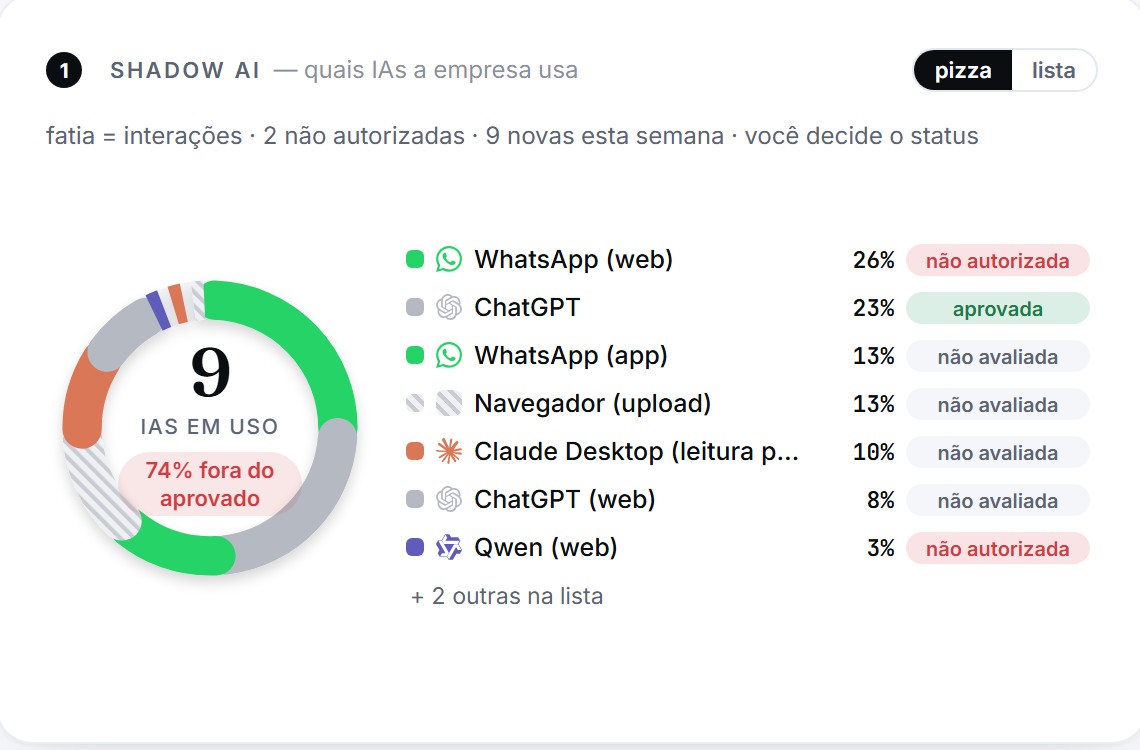
1

Shadow AI: which AI tools the company uses

By people, with the status you decide: approved, tolerated or not authorized. As a pie chart or a list.

Shadow AI card with a pie chart: WhatsApp Web 26% not authorized, ChatGPT 23% approved, WhatsApp app 13%
2

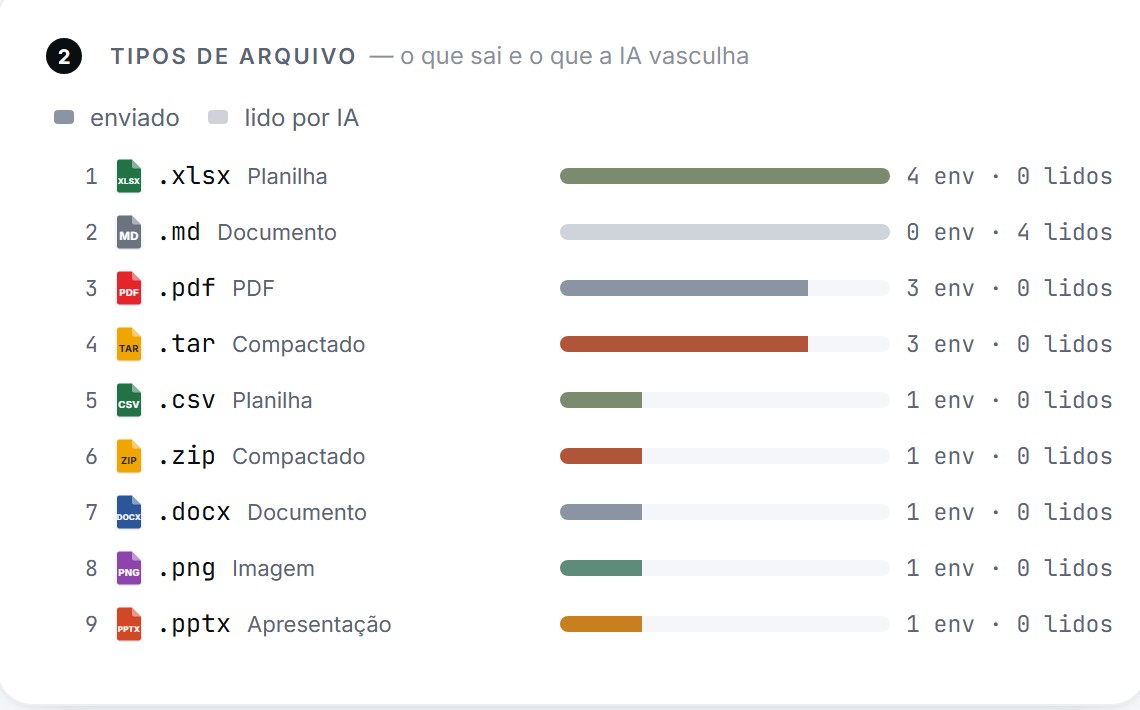
File types: what leaves and what AI digs through

Spreadsheet, PDF, code, presentation. Separates what was sent from what an AI app read from the disk.

File types card: xlsx, md, pdf, tar, csv, zip, docx, png, pptx, sent and read
3

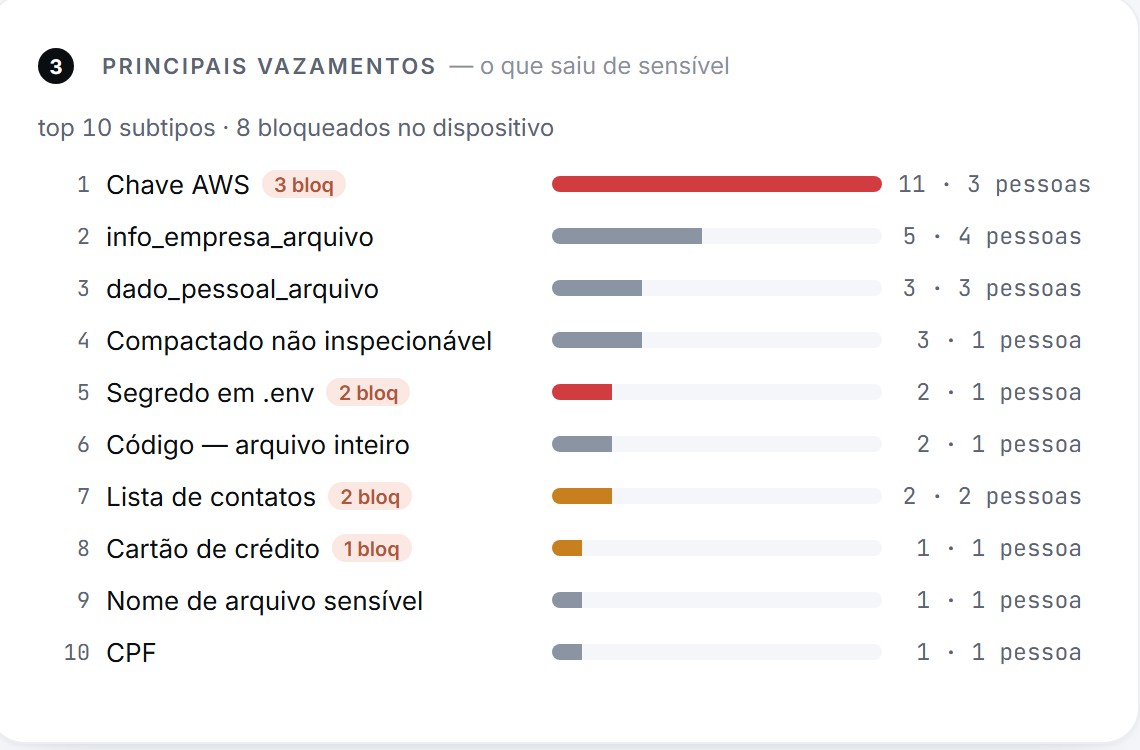
Top leaks: what sensitive data left

AWS key, secret in .env, CPF, card, contact list, source code, and how many were blocked on the device.

Top leaks card: AWS key, company information, personal data, compressed file, secret in .env, code, contact list, card, CPF
4

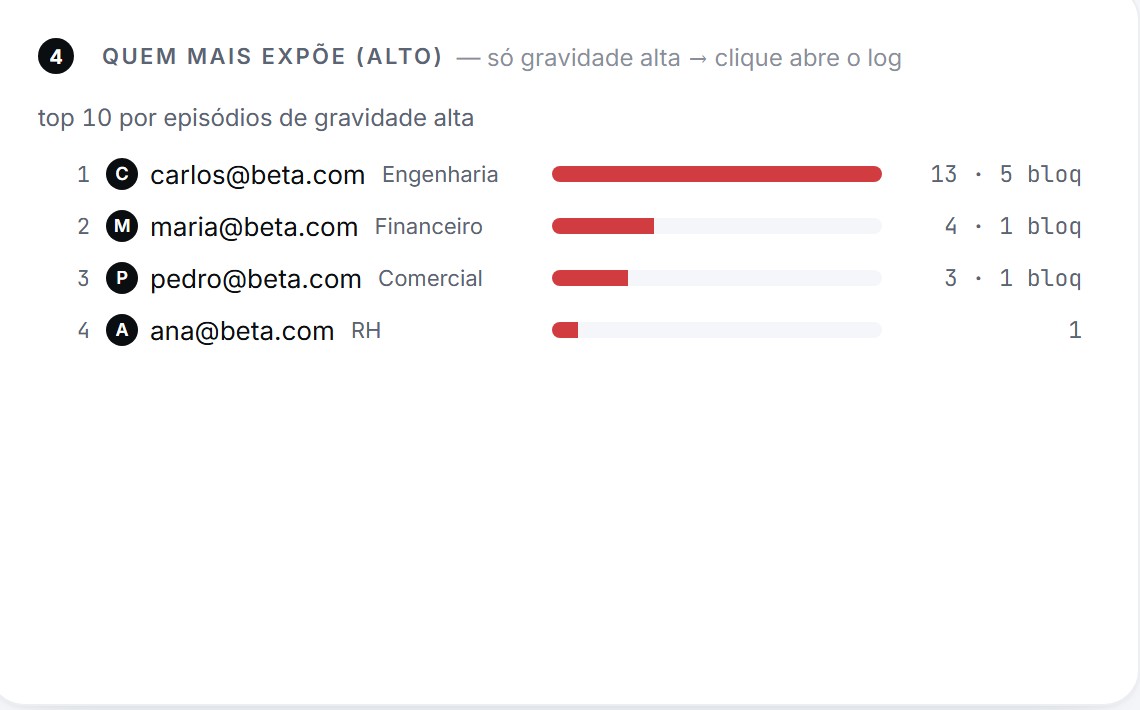
Who exposes the most (high)

People and areas with high-severity episodes. Click and their log opens, already filtered.

Who exposes the most card: people from Engineering, Finance, Sales and HR with high-severity episodes and blocks
From the chart to the record

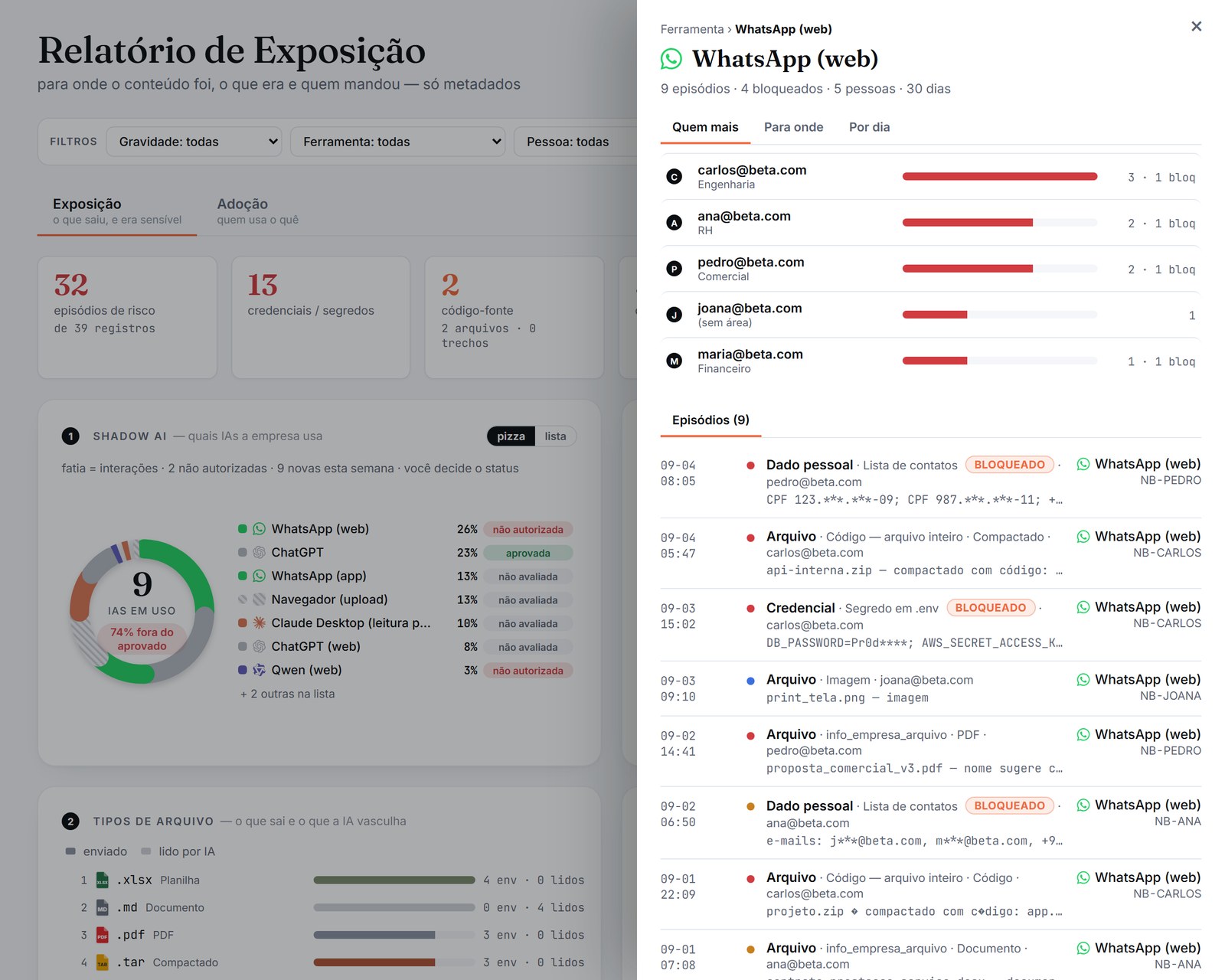
One click on “WhatsApp (web)” and the board has the answer

Who sent the most, with their area. What left. By day. And below, every episode: time, type, masked excerpt, computer and whether it was blocked. It works for any row of any card.

  • Global filter by severity, tool, person and area, applied to every card
  • Grouped episodes: the same person sending to the same destination becomes one group
  • HTML export for the board and unlimited CSV for the audit
WhatsApp (web) detail panel: 9 episodes, 4 blocked, 5 people; who sent the most, where to, by day, and the list of episodes
How it works

Three steps. The first one takes five minutes.

1

Install the agent

A Windows installer (Carbon.msi) that you download from the dashboard itself, already carrying your company’s key. Roll it out through GPO, Intune or by hand. Nothing to install in your network: the server is ours.

2

See what is already happening

Within minutes the computers show up and the dashboard starts to fill: pastes into AI tools, uploads, WhatsApp attachments, files read by AI apps, with the excerpt already masked on the device.

3

Decide, tool by tool

Mark a tool as not authorized and the agent starts blocking pastes into it, telling the person why. Approve the official ones. Export the report for the board or the CSV for the audit.

Features

Built for whoever has to answer “what left?” with evidence

Paste blocking

In a tool that is not authorized, Ctrl+V doesn’t happen and the person sees why. It is recorded as a policy event.

Looks inside Office and PDF

Code, keys and personal data hidden in .docx, .xlsx, .pptx and .pdf are detected before upload, even inside a zip.

Credentials, code and personal data

AWS keys, tokens, secrets in .env, CPF, card numbers, bulk e-mail lists, source code in full or in snippets.

WhatsApp, Teams and LinkedIn

Attachments and pastes in WhatsApp Web; files attached in the desktop apps. The channel that leaks the most is the one nobody watches.

Global filter and drill-down

Severity, tool, person and area apply to every card. From the chart to the log in two clicks.

Report and CSV

HTML to print as PDF, by section, with the filter in the header. Unlimited, streamed CSV for Excel or a SIEM.

SSO and directory

Corporate login (Entra ID), area sync from AD, or a simple CSV. Computers outside the domain too.

Alerts where your team is

E-mail, Microsoft Teams and Slack when a high-severity episode happens. A periodic summary by e-mail.

Privacy by design

Only metadata leaves the computer. The excerpt is masked on the device. Configurable pseudonymization and retention. An audit trail of everything the admin does.

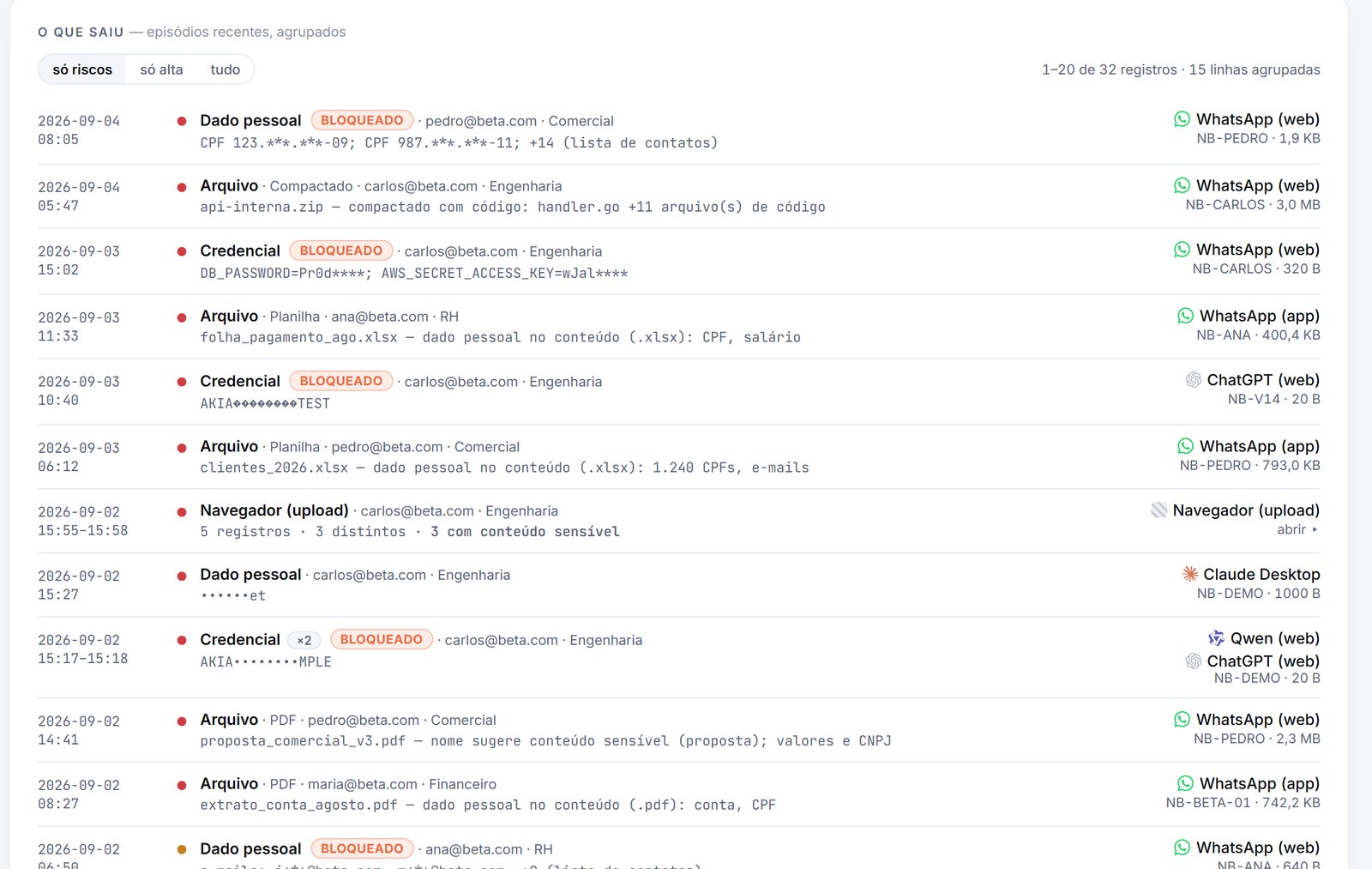
What left list: a client spreadsheet, payroll, a contract and a zip with code leaving through WhatsApp, with who sent it, their area and the blocks
What left, grouped and paginated

A client spreadsheet, payroll, a contract and a zip with code leaving through WhatsApp, with who sent it and their area. Identical rows become one with ×N. Only risks by default, “everything” whenever you want.

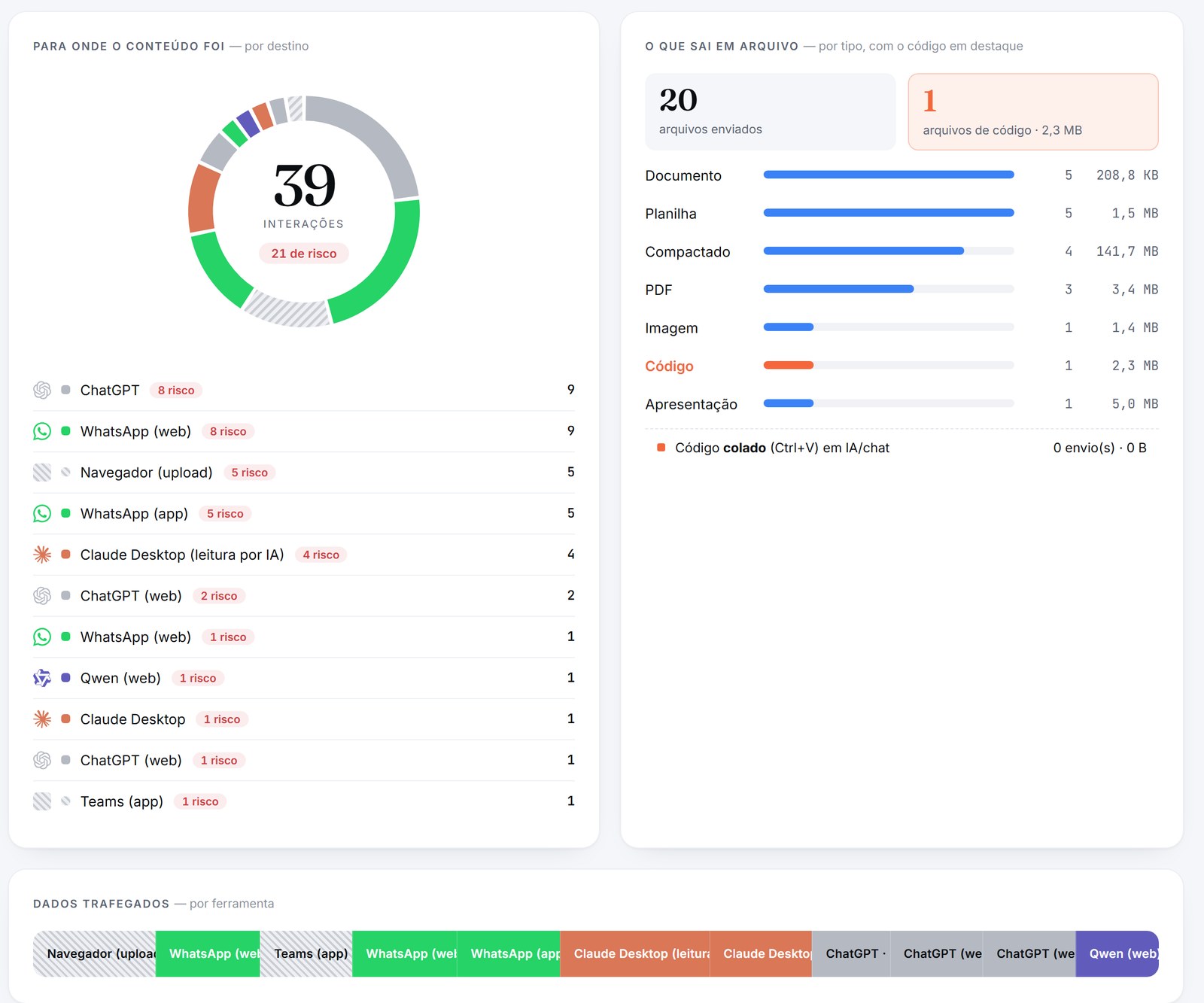
Adoption tab: where content went, files by type, data moved per tool
Adoption: who uses what

Where content went, data moved per tool, use by purpose and by area, the trend, and an inventory with the status of each AI tool.

Our own AI-guided engine

Regular DLP reads the network. Carbon understands with artificial intelligence.

The difference isn’t a tweak; it’s a new technology. While traditional DLP sifts through network packets, Carbon uses its own AI-guided engine that recognizes the data, the tool and the intent — at the exact point where the leak happens.

Traditional DLP · reads the networkCarbonAI-guided
How it recognizes risk✕Fixed rules and signatures on network packets.✓Its own AI-guided engine, which understands the data and the intent behind it.
The AI era / Shadow AI✕Doesn’t know which AI tools the team uses; blind to closed connections.✓Maps all the Shadow AI and what leaves through each tool.
Privacy✕Opens and reads all traffic; installs an intermediate certificate.✓Doesn’t read your browsing. Content never leaves the computer — only metadata.
WhatsApp and apps✕Blind spot in WhatsApp and in desktop apps.✓Sees attachments and sends in WhatsApp Web and in the app.
Response to risk✕Alerts after the data has already left.✓Stops it on the spot, in the tool you haven’t authorized.
Deployment✕Appliances, proxies and certificates inside your network.✓One installer, no server in your network, in minutes.
Data protection (LGPD)✕Sees everyone’s content — invasive monitoring.✓Metadata only, with pseudonymization and an audit trail.

Old DLP reads everything and sees less and less. Carbon, with AI, reads almost nothing and sees exactly what matters.

Pricing

Per computer, per month. No installation, no server.

Free 30-day trial, no credit card. Cancel anytime.

Starter
10 to 30 users
US$ 11/computer/month
billed monthly
  • Windows agent, installed in minutes
  • Dashboard: Shadow AI, leaks, files and people
  • Paste blocking in AI tools that are not authorized
  • Reports and CSV export
Free trial
Most popular
Business
31 to 500 users
US$ 16/computer/month
billed monthly
  • Everything in Starter
  • Corporate login (SSO) and AD/Entra sync
  • Alerts by e-mail, Teams and Slack
  • Assisted onboarding and priority support
Free trial
Enterprise
over 500 users
Talk to us
tailored proposal
  • Everything in Business
  • SLA and dedicated rollout
  • SIEM integration and per-area policies
  • Special commercial terms
Talk to us
Seat = monitored computer. Only computers with the agent installed count.Minimum of 10 computers on Starter.Taxes not included.
Frequently asked questions

What everyone asks before installing

Does Carbon read the content my employees paste?

The agent analyzes the content on the computer and sends only metadata to the dashboard: the type of data (key, CPF, code), severity, tool, size and an excerpt that is already masked, like AKIA********TEST. The full text never leaves the computer.

Does Carbon see what goes out through WhatsApp?

It sees what matters to the company: a file attached or content pasted in WhatsApp Web, and a file attached in the WhatsApp app for Windows, with type, size, severity and the masked excerpt. Conversations are not read or recorded.

Do I need to install anything in my network or change the firewall?

No. It’s one Windows installer per computer and the dashboard in the cloud. The agent talks to the server over HTTPS, like a browser. If you prefer a dedicated instance, that’s the Enterprise plan.

Does it work with desktop apps, not just the browser?

Yes. Claude Desktop, Manus and other apps that read files from the disk show up as “AI read”, separate from uploads. WhatsApp, Teams and LinkedIn on Windows are covered for file attachments. In the browser, we cover Chrome and Edge.

What happens when I mark an AI tool as “not authorized”?

The agent starts blocking pastes into that tool and shows the person a notice. Attachments and reads keep being recorded and flagged. The decision applies to the whole organization within minutes.

What about data protection (LGPD)?

The dashboard identifies people because that is how you answer “who sent it”. You are in control: pseudonymization, how long events are kept, who has access (admin, DPO, auditor) and an audit trail of everything that was viewed or exported.

How does the trial work?

You request it below and get a link by e-mail. With it you create your organization and your user, and download the installer. 30 full days, up to the agreed number of computers, no credit card. At the end, the dashboard stays read-only until you decide.
Free trial

See your Shadow AI in 30 days, no credit card

Fill in the form. You’ll get a link by e-mail to create your organization and install the agent.

  • Up to 30 computers in the trial (need more? just ask)
  • Onboarding by video call, if you want
  • Nothing is deleted at the end: you decide whether to continue
We use your data only to talk about the trial. No lists, no spam.